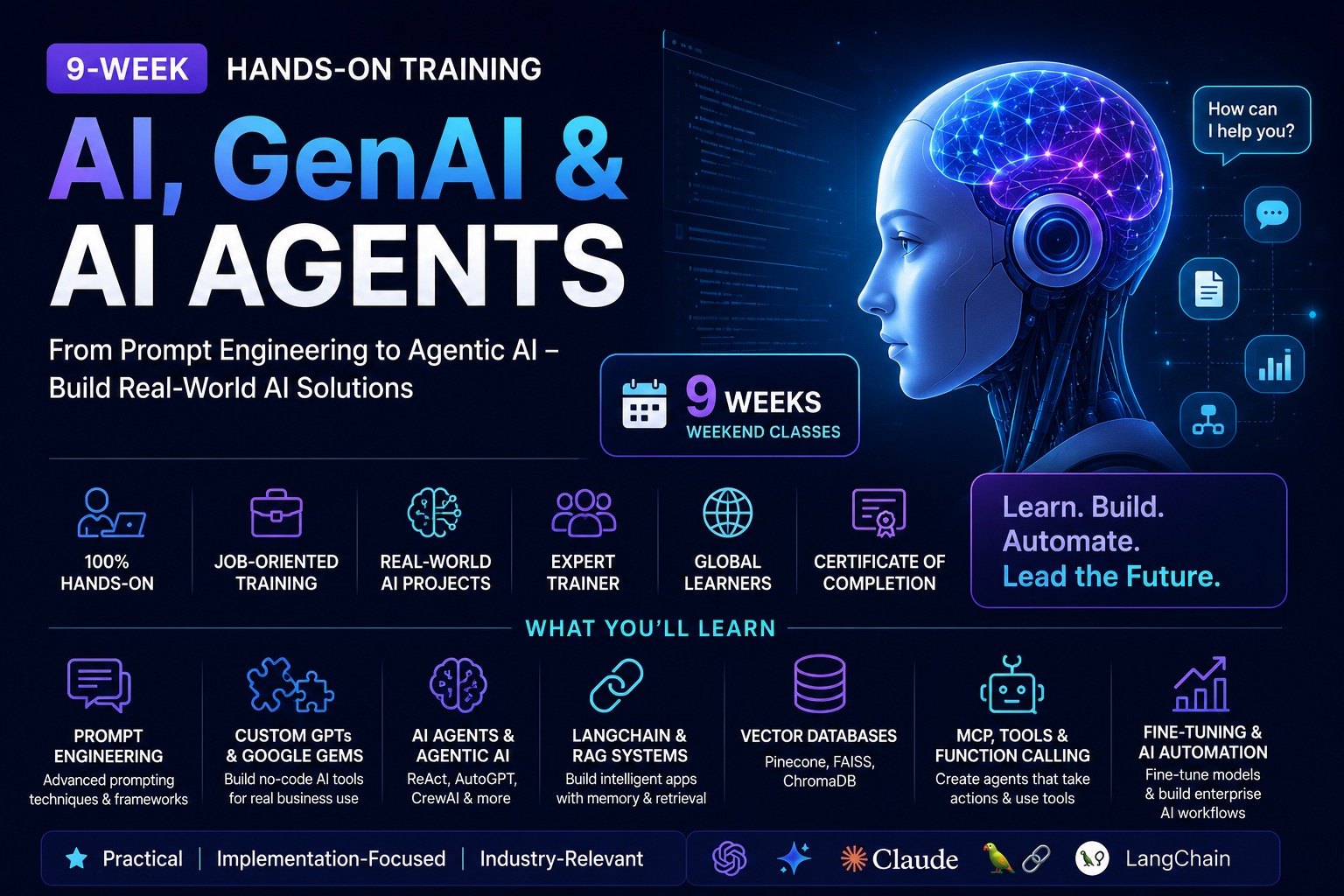
Join our 8-week Hands-on AI, GenAI & AI Agents live training and work on practical projects using industry-leading tools and frameworks. This program takes you from Python and prompt engineering foundations all the way through to building production Multi-Agent AI systems deployed on Microsoft Azure.
Python and Prompt Engineering
LangChain, LangGraph and CrewAI
AI Agents and Multi-Agent Systems
RAG, Vector Databases and Knowledge Graphs
Claude Code and MCP
LLM Evaluation and Guardrails
Azure OpenAI, AI Foundry and AI Search
FastAPI, Streamlit, GitHub CI/CD and Ollama
You will build multiple real-world projects, including a PDF Summarizer, AI Q&A application, CrewAI research team, custom MCP workflow and a production-ready Multi-Agent RAG system deployed on Microsoft Azure.
Ignite your future in Generative AI and Agentic AI with HAC. Enroll today and build the skills that power the next wave of intelligent applications.
Course Objectives
This program is carefully structured to cover the complete Generative AI ecosystem — from Python fundamentals, AI prerequisites, LLMs, Prompt Engineering and Context Engineering, to Agentic AI, Multi-Agent Systems, RAG, Knowledge Graphs, Claude Code, MCP, LLM Evaluation, Guardrails, and full Microsoft Azure cloud deployment.
Master prompt engineering techniques: zero-shot, few-shot, CRAFT and RISE frameworks.
Build AI applications end-to-end using Python, OpenAI SDK and Anthropic SDK.
Understand and apply Context Engineering for production AI systems.
Design and build AI Agents using the ReAct pattern and modern frameworks.
Implement RAG pipelines with vector databases (ChromaDB, FAISS, Pinecone) and Knowledge Graphs (Neo4j).
Build Multi-Agent Systems with LangGraph and CrewAI, including hierarchical delegation and memory.
Use Claude Code and MCP (Model Context Protocol) to build connected AI workflows.
Evaluate AI systems using RAGAS, LangSmith, TruLens and LLM-as-a-Judge techniques.
Apply AI safety guardrails, PII detection and structured output validation with Pydantic.
Deploy AI systems to Microsoft Azure — Azure OpenAI, Azure AI Search, Container Apps, CI/CD and monitoring.
Run local models with Ollama as an alternative to hosted APIs.
Hurry up and join our GenAI, AI Agents & Agentic AI with Microsoft Azure course today to propel your career to greater heights.
Show More
8 Weeks Schedule: GenAI Coverage
A hands-on journey across 8 weeks — from Prompt Engineering and Python foundations through AI Agents, RAG, Multi-Agent Systems, LangGraph, CrewAI, Claude Code, MCP, LLM Evaluation & Guardrails, and full Azure cloud deployment.
8 weeks96 topics
Prompt Engineering & Python Foundations — Part 1
A combined opening session: the morning covers core prompt engineering — zero/one/few-shot technique, structured frameworks like CRAFT and RISE, and responsible prompting — while the afternoon pivots to Python setup and the absolute essentials of the language …
Topics Covered
Prompt Engineering: zero-shot, one-shot, and few-shot prompting
System prompts vs user prompts; role-based prompting and persona design
CRAFT and RISE frameworks; bias detection and responsible prompting
No-code AI customization: Custom GPTs and Google Gems (overview)
Python environment setup: IDE choice (VS Code/PyCharm/Jupyter), virtual environments, pip
Python basics: variables, data types, control flow, functions
Hands-On
Design prompts for 3 business scenarios and compare zero-shot vs few-shot on the same task
Build a Custom GPT or Google Gem for one business use case
Install VS Code, create and activate a virtual environment, and write a first Python script
Python Foundations — Part 2: Files, Libraries & Pydantic
Round out the Python foundation with the pieces that make everything later in the course make sense: how Python actually loads and reads files, the quirks that trip up beginners, what a library really is versus writing your own code, and a first look at Pydant…
Topics Covered
What is Python, really? Interpreted language, the Python ecosystem, how code actually runs
File handling: open(), read/write modes, load functions for text, CSV, and JSON files
Common Python quirks and gotchas: mutable default arguments, indentation rules, dynamic typing surprises
What is a library? Standard library vs third-party packages, pip and imports explained properly
Introduction to Pydantic: defining data models, type validation, and why structured data matters
Hands-On
Write functions that load and parse a text file, a CSV, and a JSON file
Find and fix 3 classic Python quirks in a broken sample script
Install a third-party library with pip and use it in a script
Define a simple Pydantic model and validate sample data against it
Understanding AI Models & Context Engineering
Get an orientation across the major AI model families and how they differ in capability, context window, and cost, then move from prompt engineering into context engineering — the discipline of managing what goes into the model's context window to maximise acc…
Topics Covered
The AI model landscape: GPT, Claude, Gemini, Mistral — capabilities and trade-offs
Tokens, context windows, and pricing basics
What is Context Engineering? Beyond prompt engineering
Context window management: token budgets and truncation strategies
Conversation history management in production
Chain-of-Thought (CoT) and Tree-of-Thought prompting
Mitigating model hallucinations
Hands-On
Run the same task across GPT, Claude, Gemini, and Mistral and compare results
Build a Chain-of-Thought prompt for a logical business problem
Design a token-budget strategy for a long conversation history
Build Your First AI Project
Bring together everything from the first week and a half — prompting technique, Python, and model knowledge — into a real, working project built with plain API calls and no framework yet.
Topics Covered
Planning an AI application: defining scope, inputs, and outputs
Calling LLM APIs directly from Python (OpenAI and Anthropic SDKs)
Structuring an end-to-end script: input → prompt → model call → output
Error handling and retries for API calls
Packaging a first project so it's reusable
Hands-On
Build a working AI Q&A or content-generation tool end to end in Python, calling the API directly
Add error handling and retry logic
Package the script so it can be reused as a small internal tool
Introduction to AI Agents & Frameworks
Understand what makes an autonomous AI agent fundamentally different from the script built on Day 4.
Topics Covered
What is an AI Agent? Agent vs chatbot vs autonomous workflow
The ReAct agent pattern: Reason + Act
Evolution of AI: Rule-based systems → ML → DL → Transformers → LLMs → Agents
Real-world applications of autonomous agent workflows across industries
Introduction to tool-calling and function execution concepts
Why use a framework instead of raw API calls — a tour of the framework landscape (LangChain, LangGraph, CrewAI, Claude Code & MCP)
Hands-On
Map a business workflow into separate agent roles (Planner, Researcher, Writer)
Mock-test a manual ReAct loop using a standard LLM interface
Compare what the Day 4 project would look like rebuilt with a framework
Text Embeddings & Vector Databases
Understand how text is converted into numerical vectors (embeddings) that capture semantic meaning, and why vector databases are essential for AI applications that need to search over custom content.
Topics Covered
What are embeddings? Word2Vec, GloVe, Sentence Transformers
Dense vs sparse vectors
Introduction to vector databases: Chroma, FAISS, Pinecone
Generate embeddings using OpenAI text-embedding-3-small
Set up ChromaDB locally, store 50 documents, and run similarity search
Compare chunking strategies on a long document
Project — PDF Summarizer (RAG-lite)
Build the second project of the course: a PDF Summarizer that loads a document, chunks and embeds it, retrieves the most relevant sections, and prompts an LLM to produce a faithful summary — a lightweight, practical first taste of retrieval-augmented generatio…
Topics Covered
Loading and chunking a PDF document
Generating embeddings and storing them in a vector database
Similarity search for the most relevant sections of a document
Prompting an LLM to summarize retrieved content faithfully
Wiring it into a single end-to-end script
Hands-On
Build a working PDF Summarizer tool end to end
Test it against a long technical PDF and a short business document
Tune chunk size and retrieval count for summary quality
Frameworks Deep-Dive: LangChain & LangGraph
Move from the framework overview in Week 3 into real depth on LangChain and LangGraph — building composable chains, wiring in retrievers, and then modeling multi-step, stateful agent workflows as graphs, which is the backbone for the multi-agent project later …
Introduction to LangGraph: nodes, edges, and state graphs
Building stateful, multi-step workflows with LangGraph
When to use LangChain vs LangGraph
Hands-On
Build a document Q&A chain in LangChain
Build a simple stateful workflow in LangGraph with conditional edges
Refactor the LangChain chain into a LangGraph graph
Frameworks Deep-Dive: CrewAI & Multi-Agent Systems
With its own dedicated day, go deep on CrewAI's role-based multi-agent model: distributing work across specialized agents, hierarchical delegation with a manager agent, memory systems, and custom tools, finishing with a deployable multi-agent pipeline.
Topics Covered
What are Multi-Agent Systems (MAS)? Agent roles: Planner, Researcher, Writer, Critic
Introduction to CrewAI: Crew, Agent, Task, Process
Sequential vs hierarchical vs collaborative processes
Tool integration and custom tool creation in CrewAI agents
Memory systems in CrewAI: short-term, long-term, entity memory
Structured output schemas and human-in-the-loop checkpoints
Deploying a multi-agent pipeline with FastAPI
LangGraph vs CrewAI: when to use which
Hands-On
Install CrewAI and configure API keys
Build a 3-agent research crew (Researcher, Analyst, Writer) with a web search tool
Add a manager agent for hierarchical task delegation
Validate structured JSON output with Pydantic and deploy the crew with FastAPI
Frameworks Deep-Dive: Claude Code & MCP
Round out the frameworks block with Anthropic's own agentic stack. Understand the Claude model family and the Claude API, install and explore Claude Code, and learn MCP — the open standard that lets Claude connect to external tools.
Topics Covered
Claude model family: Haiku, Sonnet, Opus and the Claude API (messages, system prompts, tool use)
Introduction to Claude Code: agentic coding in the terminal
CLAUDE.md, hooks, and Skills for customizing Claude's behavior
What is MCP (Model Context Protocol)? Host, Client, Server architecture
Built-in MCP servers and building a custom MCP server
Introduction to Harness Engineering: automated test harnesses and auto-correct loops
Safety and responsible use of Claude in production
Hands-On
Set up the Claude API and make your first API call
Install Claude Code, write a CLAUDE.md, and create a custom Skill
Set up an MCP server with filesystem access and connect Claude to a custom MCP tool
Build a simple automated test harness with an auto-correct script that patches code until tests pass
RAG Architecture + Knowledge Graphs & GraphRAG
Formalize the RAG pattern used informally in the PDF Summarizer project into the full architecture, then add Knowledge Graphs and GraphRAG as a second retrieval strategy that captures structured relationships vector search alone misses — setting up tomorrow's …
Topics Covered
Why RAG? Solving LLM hallucination and knowledge cutoff
Retrieval strategies: similarity search, MMR; naive vs advanced RAG
Introduction to Knowledge Graphs: nodes, edges, relationships
GraphRAG: combining knowledge graphs with vector retrieval
Neo4j basics and Cypher query language
Building a graph-based retriever with LangChain
Hands-On
Build a full RAG pipeline with LangChain + ChromaDB over a multi-document set
Set up Neo4j, load sample graph data, and write Cypher queries
Combine knowledge graph + vector search in one retrieval pipeline
Project — Multi-Agent RAG + Knowledge Graph System
The flagship project of the course: a multi-agent system, built with the frameworks from Week 5, that can query both a vector store and a knowledge graph, uses BM25 hybrid search and reranking to sharpen retrieval quality, and is exposed through a Streamlit ch…
Topics Covered
Designing a project architecture that combines LangGraph/CrewAI agents, vector RAG, and a knowledge graph
Improving retrieval quality with BM25 hybrid search and reranking (Cohere Rerank / cross-encoders)
Adding a Streamlit UI so the system is usable end to end
Wiring agents, retrieval, and the UI into one deployable application
Hands-On
Build a LangGraph or CrewAI agent that routes queries to vector search or the knowledge graph as needed
Add a BM25 + reranking hybrid retrieval step
Build a Streamlit front end for the system and connect it end to end
Deploy the app locally and run a full end-to-end test
LLM as a Judge & Evaluation
Learn how to evaluate AI systems systematically rather than by eyeballing outputs — using an LLM as a judge against a rubric, and using RAGAS/LangSmith to score the RAG + Knowledge Graph project from Week 6 on faithfulness, relevance, and context precision.
Topics Covered
What is "LLM as a Judge"? Using a model to evaluate another model's outputs
Designing evaluation rubrics and scoring criteria
Pairwise comparison vs absolute scoring approaches
Design a scoring rubric and build an LLM-as-judge evaluator
Run RAGAS evaluation over the Week 6 project's RAG outputs
Build a small evaluation dashboard with LangSmith
Guardrails & Structured Validation with Pydantic
Learn why production AI systems need guardrails to prevent harmful outputs, PII leakage, and prompt injection attacks, and how Pydantic models enforce structured, validated output from an LLM so downstream code can trust the shape of the response — a pattern u…
Topics Covered
Why AI safety matters in production systems
Input and output guardrails: PII detection, toxicity filtering
Prompt injection attacks and defences
Introduction to Guardrails AI and NeMo Guardrails
Structured output validation with Pydantic models
Responsible AI principles: fairness, accountability, transparency
Hands-On
Set up Guardrails AI with a custom validation schema
Define Pydantic models to validate and coerce LLM structured output
Detect and block PII in LLM outputs
Azure Deployment I — Deploying LangGraph Agents
Move the Week 6 multi-agent project from a laptop to the cloud.
Topics Covered
Azure AI Foundry and Azure OpenAI Service
Provisioning and deploying LLM endpoints on Azure OpenAI Service
Azure AI Search as a managed vector store for RAG
Containerizing a LangGraph agent for deployment
Enforcing structured, Pydantic-validated responses in production
Azure Key Vault and managed identities for secrets
Hands-On
Provision an Azure OpenAI Service resource and deploy a chat model endpoint
Migrate the project's vector index to Azure AI Search
Dockerize the LangGraph agent with its Pydantic-validated output schema
Deploy the container to Azure Container Apps and store secrets in Azure Key Vault
Azure Deployment II — CI/CD, Monitoring & Local Model Alternatives
Finish the deployment by wiring up the Streamlit frontend, a GitHub Actions CI/CD pipeline, and Application Insights monitoring for the Azure-hosted system, then step back and compare it against running models locally with Ollama and lightly fine-tuning one wi…
Topics Covered
Deploying the Streamlit frontend to Azure App Service
CI/CD fundamentals with GitHub Actions for Azure deployments
Monitoring with Azure Monitor and Application Insights
Why run models locally? Privacy, cost, and latency
Running local models with Ollama (Llama 3, Mistral, Phi-3) as an alternative to cloud APIs
Fine-tuning basics: LoRA/QLoRA and when a custom local model is worth it
Production checklist: security, guardrails, scaling, and rollback strategy
Hands-On
Deploy the Streamlit frontend to Azure App Service and connect it to the backend
Build a GitHub Actions workflow that deploys on push to main
Configure Application Insights for the backend
Download and run Llama 3 locally with Ollama and compare it against the Azure-hosted model
Walk through a production readiness checklist for the full application
Projects Covered in the 8-Week Batch
You will build 9 real, portfolio-ready projects across the 8 weeks:
Prompt-Engineered First Agent
A Custom GPT / Google Gem built with structured prompting techniques — the first hands-on encounter with agent design.
Your First AI Project
A working AI Q&A or content-generation tool built end to end in Python, calling the LLM API directly — the milestone that proves the fundamentals before frameworks are introduced.
PDF Summarizer (RAG-lite)
A document summarizer that chunks and embeds a PDF, retrieves the most relevant sections, and produces a faithful summary.
CrewAI Multi-Agent Pipeline
A 3-agent CrewAI research crew with hierarchical delegation, memory, and a FastAPI deployment.
Claude Code & MCP Build
A hands-on project using Claude Code, Skills, Hooks, and a custom MCP server to build a connected AI workflow, including an automated self-correcting test harness.
Multi-Agent RAG + Knowledge Graph System
The flagship project: a LangGraph/CrewAI multi-agent system combining vector RAG, a knowledge graph, BM25 hybrid search and reranking, and a Streamlit UI.
LLM-as-a-Judge Evaluation Suite
A rubric-based evaluator, plus RAGAS/LangSmith scoring, applied to the flagship project's outputs.
Guardrails & Pydantic Validation Layer
An input/output safety and structured-validation layer added to the flagship project, covering PII detection, prompt injection defence, and Pydantic schemas.
Azure Cloud Deployment
My HAC YouTube Channel https://www.youtube.com/@HANDSONAGILECOACHING
Bonuses
GenAI & Agentic AI Interview questions & answers
Real-time scenarios and solutions
AWS certified Generative AI Developer certification support
Resume/CV preparation
Building Project Portfolio
LinkedIn profile optimization
Placement Assistance
On-Job Support
Target Jobs
Generative AI Engineer/Developer
Agentic AI Specialist/Consultant
AI Engineer
LLM Engineer
Prompt Engineer
AI Automation Engineer/Consultant
Program Outcome
Transition your career to GenAI & Agentic AI roles.
Land high-paying AI and GenAI jobs globally.
Up to ~300X times increment in your current salary.
Switch to Top IT & Product based companies.
Have a secured career and work in a Future trend job.
Become a top & highly paid IT professional.
Show More
FAQ
A:The HAC program is a comprehensive,
practical training course designed to help learners master Generative AI,
Large Language Models (LLMs), and Agentic AI through real-world, hands-on
projects using tools like LangChain, LLaMA, Agno, Groq, and Chromadb.
A: This course is ideal for students, developers,
data scientists, AI enthusiasts, and professionals who want to gain in-depth practical
skills in Generative AI, LLMs, and Agentic AI applications.
A: Basic programming knowledge (preferably in Python) is recommended,
but the course is structured to guide learners from foundational AI concepts to advanced implementations
step by step.
A: Unlike theoretical programs, HAC is hands-on and project-driven.
Learners build real AI systems such as RAG pipelines, multi-agent architectures, and LangChain-based
applications using modern frameworks and tools.
A: You’ll work with OpenAI APIs, Hugging Face, LangChain,
LLaMA, Groq, Agno, and Chromadb, along with frameworks for transformers, vector databases,
and prompt optimization.
A: By the end, participants will be able to design, develop,
and deploy Generative AI models, AI agents, and multi-agent systems, and understand how to fine-tune,
evaluate, and scale them ethically.
A:Learners will build prompt-based AI models, LangChain-powered chatbots,
RAG pipelines, vector database search systems, and Agentic AI applications using LLaMA and Agno frameworks.
A: The course is divided into 12 modules, starting with AI fundamentals and
progressing to advanced topics like transformers, prompt engineering, RAG systems, multi-agent systems, and ethics
in GenAI.
A: Yes. Participants who complete all modules and projects successfully
will receive a certificate of completion, validating their expertise in Generative AI and Agentic AI technologies.
A:Graduates will gain in-demand skills to pursue roles such as AI Engineer, Prompt Engineer,
LLM Developer, Data Scientist, or AI Researcher, and will be equipped to contribute to real-world AI innovation and enterprise projects.
Chirantan is an Enterprise AI Trainer with more than seven years of experience delivering practical AI learning programs to working professionals and career changers globally. He has built and trained teams across banking, fintech, retail and healthcare sectors, bringing real deployment experience into every session.
His core expertise includes AI-driven analytics and real-world AI projects involving NLP, LangChain, Large Language Models (LLMs), AI agents, and AI automation solutions that enhance reporting, intelligent decision-making, and enterprise business workflows.
With a practical, implementation-focused, and industry-oriented teaching approach, Chirantan customises use cases for sectors such as banking, fintech, retail and healthcare.


 Bestseller